Pool
One bare repository per repository you use, fetched once and kept in sync. The only copy that talks to the network.
Run ten or a hundred AI agents on the same repository. gitd gives each one its own writable copy in milliseconds, and turns their commits into branches — your token never enters a sandbox.
Apache-2.0 · v0.7.0 · Linux · any git host
$ REPO=https://github.com/kubernetes/kubernetes$ gitd prepare $REPO /work/agent-1✓ fetched once, template built · 12.2 s$ gitd prepare $REPO /work/agent-2✓ ready · overlay · 23 ms · 4.3 MB# agent-1 edits, tests and commits$ gitd publish /work/agent-1 agents/fix✓ pushed agents/fix with gitd’s tokenGive a hundred agents the same repository and you usually get a hundred clones, a hundred fetches and a token in every sandbox. With gitd they share one pool and one template, and each gets a thin layer of its own.
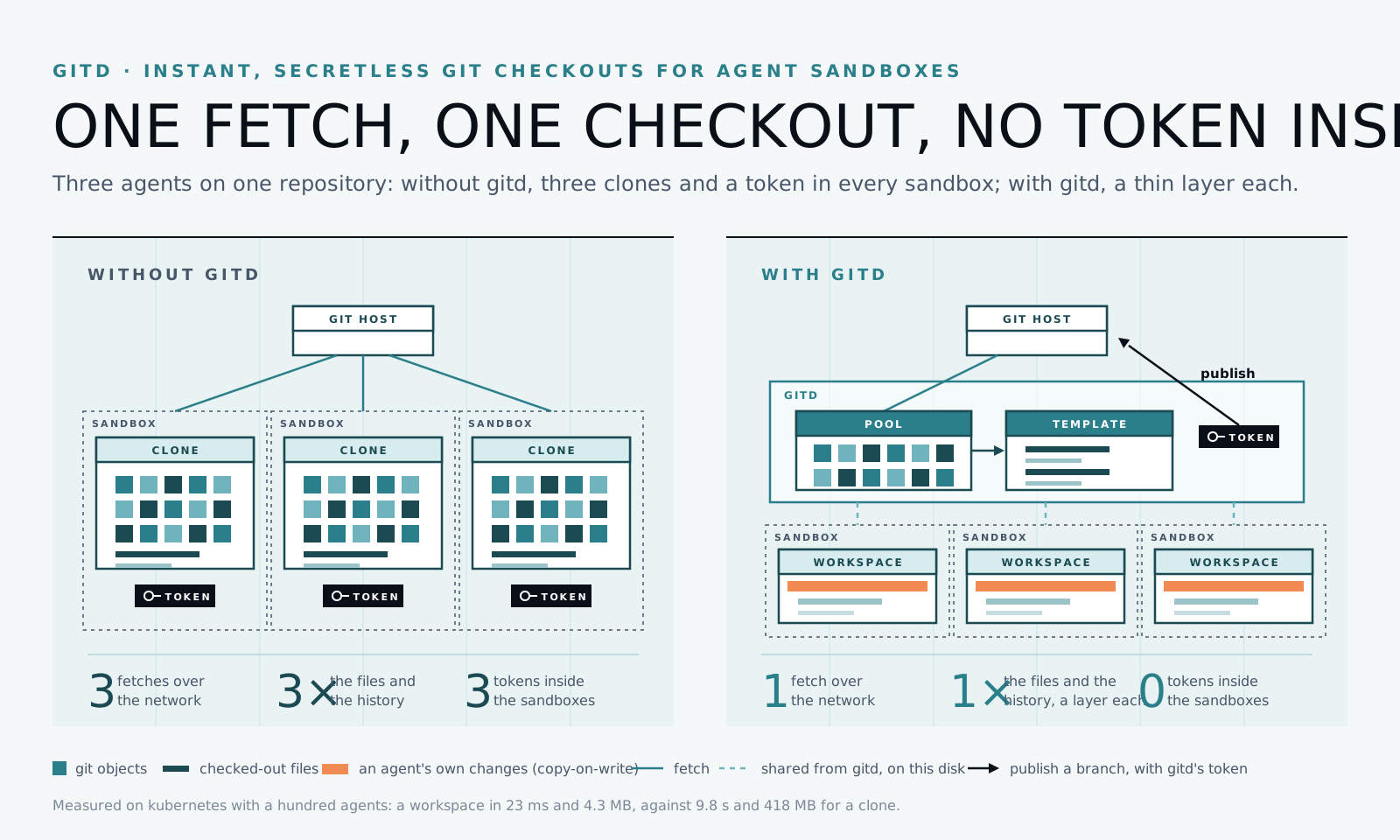
gitd runs the official git binary in a closed environment, and builds everything aside before moving it into place.
One bare repository per repository you use, fetched once and kept in sync. The only copy that talks to the network.
One checkout per commit, written once and shared, read only, by every workspace of that commit.
A copy-on-write layer on the template, mounted where the agent works. Plain git; only what the agent changes takes disk.
The agent commits; gitd pushes the commits to a new branch from the pool, with the token it keeps. Never forced.
Every decision, with its reasons: DESIGN.md
Each agent gets its own copy of kubernetes/kubernetes, on a GitHub runner, 4 CPUs. Measured by a workflow anyone can run again.
67×
faster
49×
less disk
First workspace: 12.2 s, the fetch and the template.
99 workspaces in 2.0 s, 8 at a time; all 100 clean to git.
4.3 MB each, mostly git’s own index.
Or run all of it with Docker: two sandboxes, copy-on-write workspaces, and no token in either.
One binary, or the image. It answers on a Unix socket; gitd-mount, a tiny root helper, mounts the copy-on-write workspaces so gitd needs no privilege.
$ docker run -d --name gitd \
  -v gitd:/var/lib/gitd \
ghcr.io/dooservice/gitdCredentials live in gitd’s configuration, each naming where its secret is, never the secret. No agent or sandbox ever holds one.
[[credentials]]
prefix = "https://github.com/your-org"
token_env = "GITHUB_TOKEN"The first one fetches; every one after takes milliseconds and almost no disk.
$ REPO=https://github.com/your-org/app
$ gitd prepare $REPO /work/agent-1Mount the workspace into its sandbox. It is a normal git checkout: edit, test, commit.
$ git commit -am "Fix the login"gitd pushes the agent’s commits to a new branch with the token it keeps, ready for a pull request.
$ gitd publish /work/agent-1 agents/fixNo call takes a credential: gitd reads and publishes with the ones it keeps.
Eight tools for Claude Code, Cursor or any MCP client. None takes a credential.
{
  "mcpServers": {
    "gitd": {
      "command": "gitd",
      "args": ["mcp"]
    }
  }
}pip install gitd
from gitd import Gitd

with Gitd() as gitd:
    ws = gitd.prepare(
        "https://github.com/acme/app",
        "/work/agent-1",
    )
gitd.publish(ws.path, "agents/fix")npm install gitd-client
import { Gitd } from "gitd-client";

const gitd = new Gitd();
const ws = await gitd.prepare({
  url: "https://github.com/acme/app",
  path: "/work/agent-1",
});
await gitd.publish(ws.path, "agents/fix");The same binary is its own client; ConnectRPC (gRPC, Connect) on the socket for any language.
gitd prepare URL PATH
gitd describe PATH
gitd publish PATH BRANCH
gitd audit --since 24hWhat gitd protects, from whom, and what it leaves to you is written down, each claim with the code or the test behind it.
SANDBOX
git push origin agents/fix
credentials: none
GITD · PUBLISH FROM THE POOL
POST /acme/app.git/git-receive-pack
Authorization: Basic ••••••••••••
Credentials stay in gitd and reach git only as a header scoped to one repository. Pushing happens from the pool, never from the workspace an agent could tamper with.
gitd audit --since 24h
New branches only, never forced, and under a prefix you choose (agents/…). Every publish, done or refused, is in an audit log.
workspace/.git/config
Before gitd runs git in a workspace, its configuration and git directory are checked: nothing in them may run a command or lead gitd elsewhere.
GITD
uid gitd · no capabilities
GITD-MOUNT
root · 4 capabilities
mount overlay templates/… + layers/… → workspaces/agent-1
✓ only inside the directories root configured
gitd runs unprivileged. gitd-mount, a small root helper, mounts overlays only inside the directories root configured, for gitd’s user only.
Git hosts, over HTTPS or SSH
Nested GitLab groups, any port, submodules included.
Sandboxes
Worktrees share one repository’s refs and configuration, cannot check out the same branch twice, and break when mounted into a container. A gitd workspace is a repository of its own that borrows objects from a pool and files from a template.
No. gitd runs unprivileged; copy-on-write workspaces are mounted by gitd-mount, a small helper that holds only the capabilities mounting an overlay takes. Without it, gitd writes each workspace’s files and still fetches once.
Any host over HTTPS or SSH, on any port: GitHub, GitLab with nested groups, Bitbucket, Gitea, Forgejo, Codeberg or your own. Submodules included.
A normal git checkout: it can edit, run, diff, stash and commit with plain git. When it is done, gitd publishes its commits as a new branch.
Not yet: LFS files are pointers in a workspace, and gitd says which. Support will come if users need it.
Nothing. gitd is open source under the Apache License 2.0.